FUTURES RISK PLANNER
Model the liquidation price after each planned order.
A planning tool for Binance USDⓈ-M linear perpetuals in isolated margin. Before stepping away, check liquidation risk and a stop reference after every planned add-on order fills.This is a Binance USDⓈ-M isolated-margin model, not investment advice. Bybit, OKX, and other venues use different maintenance, fee, and liquidation rules, so their calculated values can differ. Cross or portfolio margin, maintenance tiers, funding, reserved order margin, and slippage can change the outcome.
1. CURRENT POSITION
Enter the values displayed by your exchange.
Enter it to see estimated P&L and return on collateral at each stage. The stop closing fee is included; prior entry fees and funding are not.
IMPROVE ACCURACY (RECOMMENDED)
Enter the quantity only when Size is shown in coin units such as TUT. Size (USDT) is not this quantity: switch to coin units or use Size (USDT) ÷ Mark Price (USDT) as a reference. Enter entry and quantity together.With these fields blank, the quick model assumes current margin × leverage equals current notional. That can be wrong after adding margin or changing leverage.
2. UP TO FIVE PLANNED ADD-SELL ORDERS
Compare adding position size with adding margin only.
A position add is entered as order notional (USDT). A margin-only add is the actual margin (USDT) placed into the position.
THE DIFFERENCE
Values below 0.5% still use a 0.5% calculation buffer. At the base state, it shows an earlier-warning price above Binance's displayed liquidation for longs and below it for shorts.
3. RESULTS BY FILL
How can the stop act before liquidation?
Enter current margin, leverage, and your exchange's displayed liquidation price to see the result for each stage.
INPUT WALKTHROUGH
Transfer the exchange values in the numbered order.
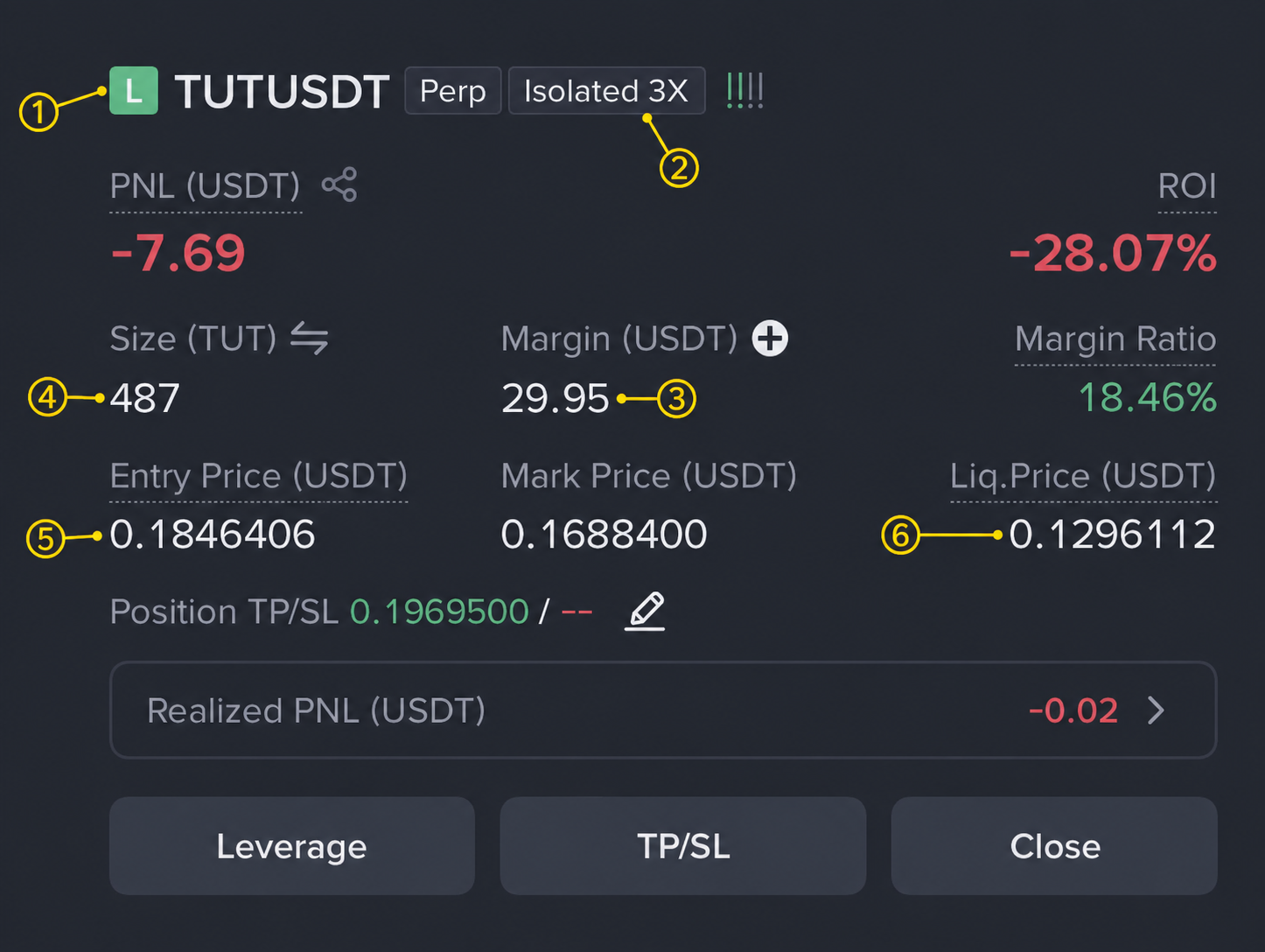
- ① L / SL is Long and S is Short. Choose the same position side above.
- ② Isolated 3XConfirm Isolated, then enter 3X as Leverage for added orders.
- ③ Margin (USDT)Enter it as Current isolated position margin.
- ④ Size (TUT)When Size is set to a coin unit such as TUT, enter it directly as Actual position quantity. This screen uses 487.
- ⑤ Entry Price (USDT)Enter it as Actual average entry.
- ⑥ Liq. Price (USDT)Enter it as Displayed liquidation price.
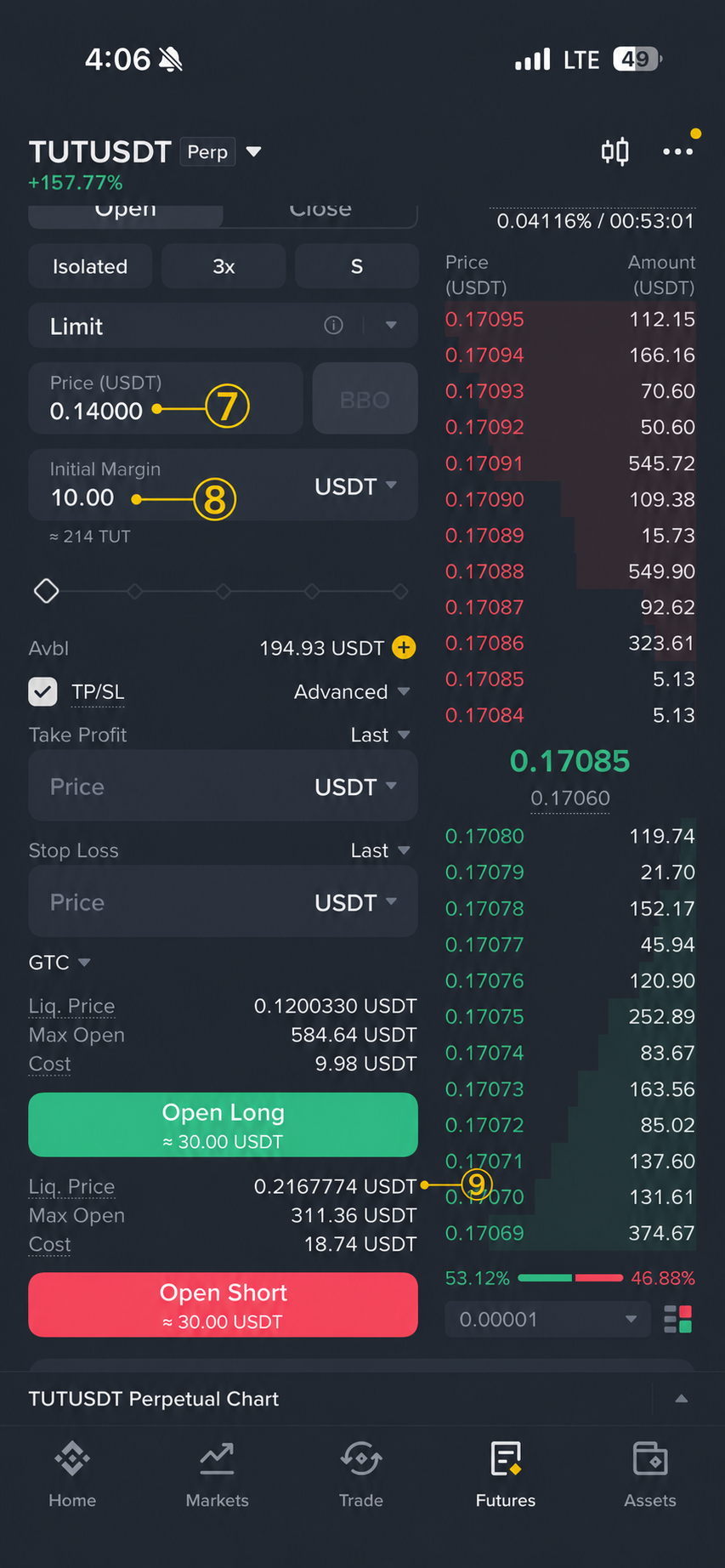
- ⑦ Price (USDT)Enter it as the first add-on Fill price.
- ⑧ Initial MarginThis is not position-add order notional. Enter Initial Margin × 3x instead. Example: 10 USDT × 3x = 30 USDT.
- ⑨ Liq. Price (USDT)Enter the preview next to the selected Open Long or Open Short action as the first Binance preview liquidation price.
Reference — Binance can switch Size units. When it shows Size (TUT), as above, enter 487 directly as Actual position quantity. In the Size (USDT) example below, the figure is not quantity: switch to coin units or use Size (USDT) ÷ Mark Price (USDT) as a reference.
WHY PRE-SETTING A STOP IS DIFFERENT
The order of execution matters more than a simple 0.5% gap.
- 01Liquidation can be based on mark priceA stop based only on the chart's last trade can fire later than mark-price liquidation. Where supported, check a mark-price trigger first.
- 02Extra orders can be cancelled during liquidationIn an extreme-risk state, unfilled add-on orders may be cancelled. Treat the assumption that the next order will definitely fill as optimistic.
- 03Make the stop reduce the existing positionUse Close-on-trigger or Reduce-only, then recheck quantity, trigger source, and market/limit conditions in the exchange order screen.
MODEL ASSUMPTIONS & CAUTIONS
This is a Binance USDⓈ-M isolated-margin model for linear USDT contracts. Maintenance-related reference values are refreshed regularly but are not real-time. Recheck Binance and the order-preview Liq. Price after an added order. Conservative planned liquidation applies at least a 0.5% adverse buffer. It cannot guarantee the actual liquidation price, exchange rules, or execution. Other exchanges can produce different values.
- Actual liquidation can differ because of maintenance brackets, funding, execution, and exchange rules. If the model differs materially from the exchange even with actual entry and quantity entered, do not place orders until you understand why.
- In a fast or illiquid move, limit orders and stop-market orders may not fill as expected, or may fill at a worse price.
- Review the funds needed at every stage and margin reserved for open orders against your own account balance.